

Table of Contents:
Telegram is a messenger for exchanging data between users. It allows you to have private or group conversations, subscribe to channels, create conferences and use/create bots. It also supports the exchange of files, multimedia in different formats. Well, the owner and main developer is Pavel Durov. Yes, yes, the very creator of the social network VKontakte. And now let’s talk about everything in order and in detail.
Short answer: buy a cheap virtual number for Telegram, paste it into the sign-up screen, and copy the verification code that arrives in your dashboar. The whole flow takes under two minutes and costs around $0.05–$0.30 for a one-time number.
Main Feature of Telegram
The main feature of the app is the privacy of all users. However access to personal files is strictly forbidden to anyone other than the account holder, and correspondence is only visible to the chat creator and the person you are chatting with. Sounds great, doesn’t it? Also, when you register each user is given a unique “nickname” and the created account is linked to your phone number. Correspondingly, to be authorised on another device, you will have to be verified by a code from a text message. In other words, no one else can access your account without a phone number.
Why People use Telegram without a Phone Number
Telegram still requires a phone at sign-up, but it doesn’t require your phone. People use a virtual number for Telegram for very practical reasons:
- Second account — work and personal kept separate, without juggling two SIMs.
- Privacy — your real number is searchable in contacts; a burner isn’t.
- Travel and roaming — your home SIM is off, but you still need to log in on a new device.
- Multi-account management — SMM agencies, community managers, traders running several channels.
- Bots and automation — testing, monitoring, scraping public channels via a clean account.
You’re not breaking Telegram’s rules by using a virtual number. You’re breaking the assumption that you must hand over your personal SIM to any app that asks.
What to Look for in a Virtual Number for Telegram
Not every cheap number works. Telegram is one of the stricter services: it blacklists ranges that have been recycled too many times. Use this checklist before paying:
- Service-specific pricing. Good providers list a separate price for “Telegram” instead of one flat rate. That means the inventory is filtered for this app.
- Country availability. Indonesia, India, Brazil, Nigeria, Vietnam and the Philippines tend to have the cheapest working numbers. US and UK numbers are pricier but more durable.
- No-SMS refund. If the code never arrives, the number should be auto-refunded within 20 minutes. This is standard — if a service doesn’t offer it, walk away.
- Short-term vs. rental. A one-time number works for sign-up only. If you ever want to log in from a new device months later, rent the number for 30+ days so you can receive the new code.
- Payment options. Card, crypto, or a balance top-up — anonymous payment matters if privacy is the reason you’re here in the first place.
How to Get a Telegram Verification Code Without Using Your Real SIM
It’s not a secret that you can use virtual numbers to avoid leaking your personal data and stop receiving spam messages to your number. But finding a reliable service in 21 century is complicated. We are glad to introduce to you our service “Sms-man” which offers to buy a virtual number for Telegram from 5 cents.We have collected for you Telegram SMS activation numbers from 236 countries. You need to fund your account with any e-wallet or crypto.
Buying a virtual number for Тelegram became even easier, as we have prepared a step-by-step instruction for our customers:
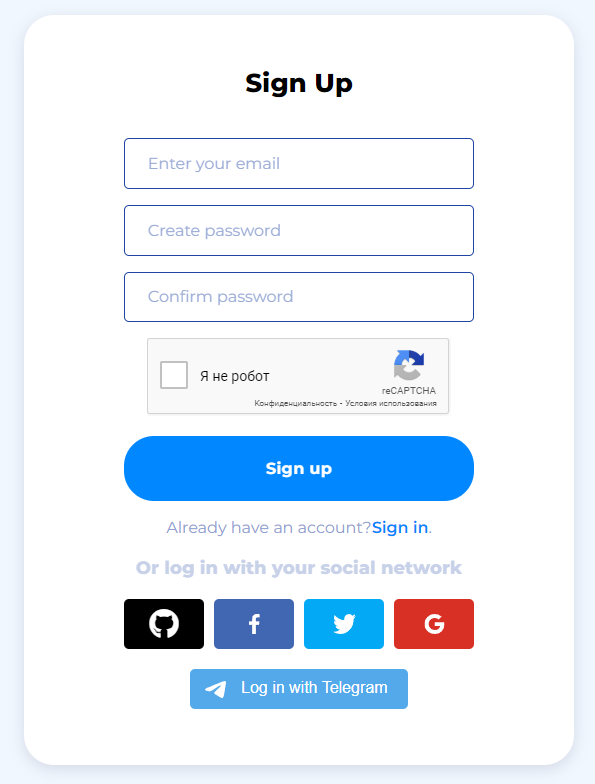
- Firstly you need to register on sms-man.com. Registration process is simple, just use email and create password.(Don’t forget to confirm your email)
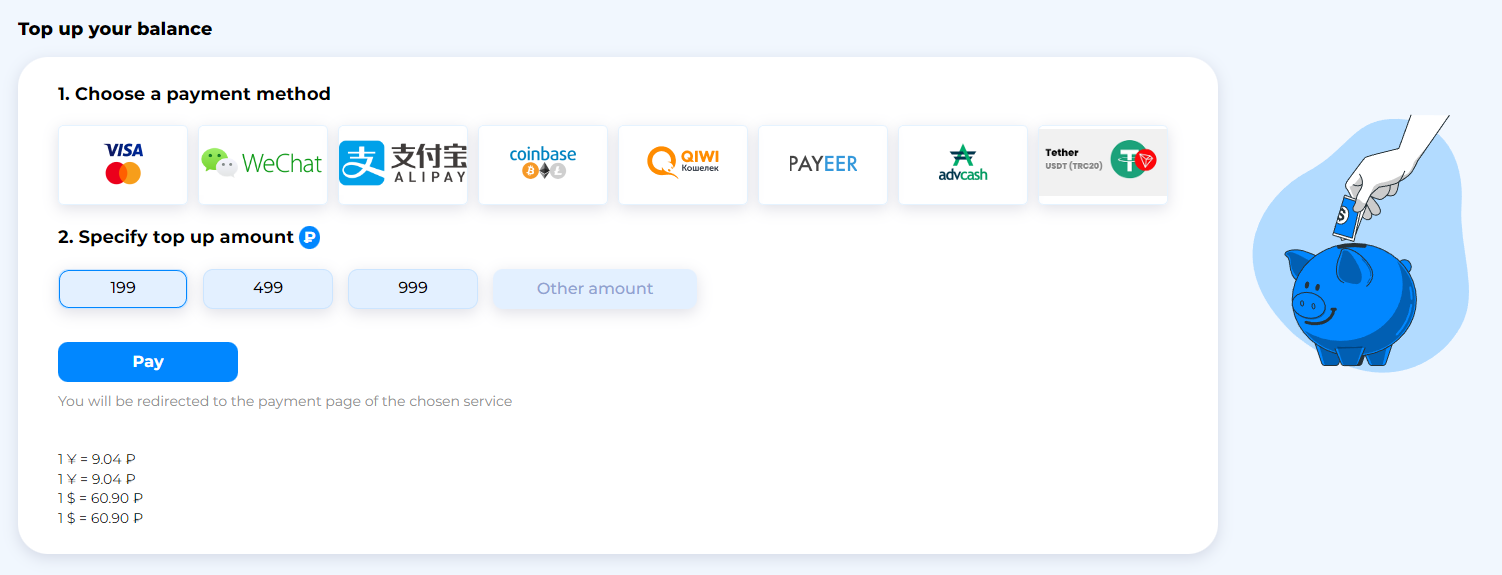
2.Secondly you will need to open the “Payment” section and recharge balance with Qiwi, Payeer, AdvCash or exchange/wallet Coinbase.
3. Go to the main page and click on “Choose an application”.
4. Enter in the search box the name of the messenger, as shown on the photo.
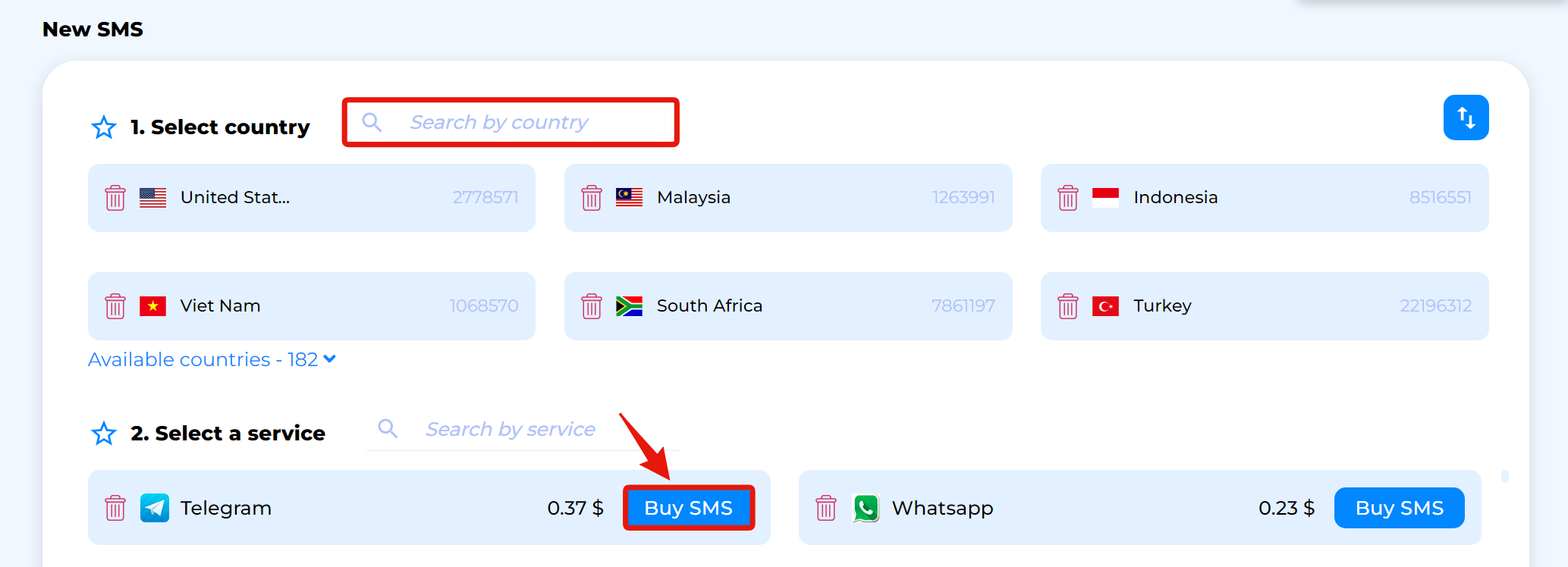
5. A huge list with virtual numbers for Telegram opens in front of you. Choose one of them by clicking the “Get” button next to it.
6. If you have not copied the number you bought, copy it in the “History” section.
7. Open service, choose the country code of the mobile operator and insert the copied number in the lower field.
8. You can get the activation code sent in the SMS in the section “History” clicking on the button “Get SMS”.
9. Copy the code and paste it into the registration field and press “Next”.
Done. In this way, it is possible to register many accounts on the popular Russian messenger using virtual numbers for Telegram. Each of them costs only 7 cents.
Common Problems When Getting a Telegram Verification Code
A few things people run into, and how to dodge them:
- “Too many attempts.” You hammered the “Resend code” button. Wait 10–15 minutes, then try a different country.
- Code never arrives. The number was burned. Cancel, get a refund, pick another country. Don’t keep retrying on the same number.
- Code arrives but Telegram says “invalid.” You’re looking at an old code in the message log. The latest one is always at the top.
- Account banned a day later. This happens with extremely cheap recycled numbers. Spend $0.10 more on a country with fresher inventory (Malaysia, Romania, Kazakhstan are usually reliable).
- Can’t log in later from a new phone. You used a one-time number. Next time, rent the number — it costs a few dollars but stays yours.

Vyacheslav is SEO expert at SMS-MAN. He also writes on virtual numbers and SMS verification issues on SMS-man Blog.
You can reach Vyacheslav at: z@sms-man.com

